 PortalCal
A calendar feed that Outlook or Google
will not keep updated?
PortalCal keeps an .ics, iCal or webcal link current in the calendar you already use — including a feed that asks for a username and password.
Any schedule that comes as a calendar link — work, school or club — in Outlook or Google Calendar automatically, on your phone, watch and computer. Every event and every change, checked every five minutes, or less often if you prefer, with an alert if syncing ever stops and a history that never disappears. Nothing is stored on a server.
The download is the trial: no key, no card and no email to start. Then $20/year — buy a subscription whenever you are ready.
Windows 10 or 11 · macOS 14 or later · also in the Microsoft Store and the Mac App Store
Version 1.36 · updated 14 October 2026 · What's new
Why “subscribe” is not enough
Outlook's Subscribe from web and Google Calendar's From URL both take a calendar link, and both leave you with a copy that updates when they choose. Microsoft says a subscribed internet calendar refreshes about every three hours and can take more than a day; Google says changes can take up to twelve hours. Neither has a refresh button, neither can sign in to a feed that needs a username and password, and when a subscription quietly stops updating, nothing tells you.
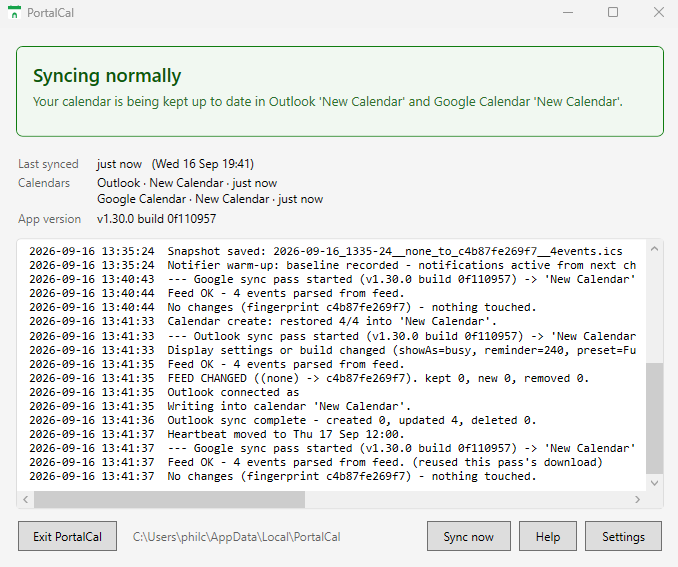
PortalCal does the fetching itself, on your computer, every five minutes, signs in to the feed if it needs to, and writes the events into your calendar as real events. Outlook internet calendar not updating? · A feed that needs a password, in Google Calendar · No CalDAV, or CalDAV will not connect?
Built for schedules that change
Outlook and Google
Writes into a calendar of its own inside your account, so your events show up on your phone, watch and tablet without touching your personal calendars.
Always current
Checks your feed every five minutes, or less often if you prefer. New shifts, moved start times and cancellations land in your calendar as your service publishes them.
Runs quietly
Lives in the notification area (the menu bar on a Mac), starts when you sign in, and tells you in plain language if syncing ever stops.
Your history, kept
Most feeds only publish a few weeks or months. PortalCal keeps every event it has ever seen, on your computer, and can export it any time.
How it works
- Install PortalCal
Windows: from the Microsoft Store in one
click, or download it and run the installer.
Mac: from the Mac App Store, or download it, open the disk image and drag PortalCal to Applications. - Connect your feed Paste the calendar feed link from your service into Settings — and its username and password, if the feed has them.
- Choose Outlook, Google, or both Sign in with Microsoft or Google, pick a calendar, and your events appear and stay current from then on.
- Use it free for 30 days There is nothing to sign up for: no key, no card, no email. The 30 days start the first time PortalCal opens, and it shows how many are left.
When the 30 days end, on either computer: buy a subscription ($20 a year) and paste the key that is emailed to you into Settings. Your calendars, settings and history carry straight on.
The full install guide (PDF): for Windows · for Mac — every screen, from install to the first events appearing.
What you need
Windows 10 or 11, or a Mac with macOS 14 or later; a calendar feed link from your schedule or
calendar service (the kind that usually ends in .ics,
plus its login if it has one), and an Outlook (personal or
Microsoft 365) or Google account for the calendar. One license
key activates one computer at a time, and you can move it between
computers whenever you like.
Nothing else to install: everything PortalCal needs is inside the installer. On Windows it installs under your own account and never asks for an administrator password; on a Mac it is an app notarised by Apple that you drag to Applications. Your feed login is stored encrypted on your computer (in the Keychain on a Mac) and is only ever sent to the feed's own server.
Works with any calendar feed that is a plain link, or a link with a username and password. Not sure which kind yours is? The trial is free for 30 days — connect your feed first and pay only if it works.
Did your browser warn you about the download? What to do about the browser warning.